Why height beats width
Take a 100 × 50 cm desk. That is 5,000 cm² in total, and a standard monitor stand with a 45 × 20 cm base takes 900 of them before you place a notebook. The stand is not the problem. The problem is that its base sits in the same plane as everything your hands actually use.
Going vertical means lifting the things you only look at (screens, lamps, speakers) or only occasionally touch (laptops, tablets, headphones), so the desk top is left for the hands. Our rule of thumb: if you look at it more than you touch it, it should not be standing on the desk.
Clamp arms: the big win
A clamp-on monitor arm grips the rear edge of the desk with a pad of about 8 × 6 cm and carries the screen on a pole. The footprint drops from roughly 900 cm² to 48 cm². Before buying, check five things:
- Desk thickness. Compare it with the clamp's stated range. Thin boards and glass tops need the maker's bracket or a steel reinforcing plate.
- Edge shape. A lip, a raised back panel or a cable cut-out can stop a clamp seating. Some arms offer a grommet mount through a hole instead.
- VESA pattern. Most monitors use 75 × 75 or 100 × 100 mm mounting holes under the VESA MIS-D standard. If yours has none, an adapter plate exists.
- Weight rating. The arm's rated load range, in kilograms, must include your screen. An under-loaded gas-spring arm drifts upward.
- Reach. On a narrow desk against a wall, a short pole with a tilt joint beats a long articulating arm.
Once mounted, the screen can sit right above your keyboard tray or slide to the side. That is how people with 40 cm-deep desks still get a sane viewing distance. Common ergonomic guidance puts the screen about an arm's length away, around 50 to 70 cm.
Risers with a shelf: when you cannot clamp
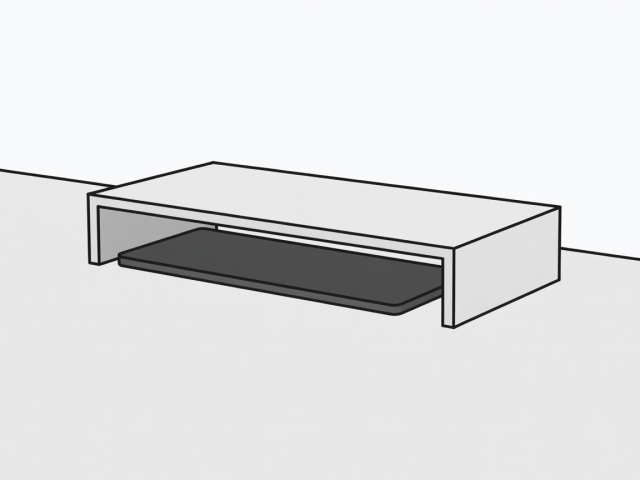
Rented desks, glass tops and desks with a rear panel rule out clamps. A riser with feet at the corners is the next best thing, because the space under the platform stays usable. A slim keyboard slides in when you are not typing, and a notebook or tablet fits underneath.
Judge a riser by its feet, not its top. Four feet of 3 × 3 cm each cost 36 cm² of surface, while a solid-base stand costs the entire base. Look for a clear gap of at least 8 to 10 cm beneath, and a top wide enough to carry the screen's own foot without overhang. Skip risers with built-in drawers on tiny desks: the drawer needs clearance in front, which is exactly the zone you are trying to protect.
Laptops: stand, dock or stack
A laptop lying flat uses roughly 32 × 22 cm, about 700 cm². Standing it on its edge in a vertical dock costs about 7 × 25 cm, or 175 cm². That works well if you use an external monitor and keyboard (clamshell mode). If you type on the laptop itself, a fold-flat raised stand gives a better screen angle and packs down to something you can slide into a bag.
Check heat before committing. A closed laptop in a dock should be one that supports clamshell use, and the dock must leave the vents clear.
Quick comparison
| Option | Typical desk area used | Needs | Best for |
|---|---|---|---|
| Solid-base monitor stand | ≈ 900 cm² | Nothing | Deep desks |
| Four-foot riser | ≈ 36 cm² of feet, platform usable beneath | 8–10 cm clear gap | Rented desks, glass tops |
| Clamp arm | ≈ 48 cm² | A clampable edge | Narrow desks |
| Vertical laptop dock | ≈ 175 cm² | Clamshell-capable laptop | External monitor setups |
All figures are typical examples for a 100 × 50 cm desk. Measure your own pieces before deciding.
What to skip
Dual-monitor stands with one wide base, tiered "command centre" shelves that need 30 cm of depth, and standing-desk converters on desks under 70 cm wide. The converter's base usually costs more area than it frees.